 I sync my iPhone, MacBook and iMac over MobileMe. I like that a change in an appointment or contact on one device shows up on the other two. But MobileMe has a problem! Twice in the last week I have opened my iPhone to find that all my Contacts were gone. This calamity mysteriously happened on its own. (I did not make any setting changes to lose my contacts.) But here’s how I got them back.
Note: This post detail the process for restoring contacts when running iPhone 3.0 software. If you are using iOS 4, follow this link to my July 2010 update.
1. On my iPhone I went to “Settings” and picked “Mail, Contacts, Calendar.”
All the email accounts you have on your iPhone will be there as choices along with your MobileMe account.
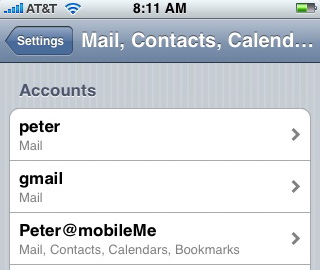
2. Under accounts I selected my MobileMe account. You get a list of all the data that MobileMe is syncing.
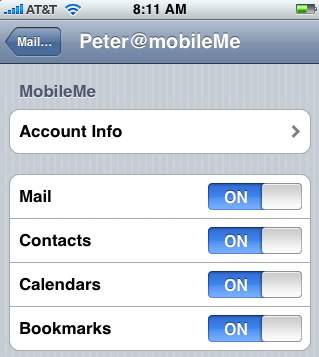
3. I turned Contacts “Off.” (It’s the only sync I turned off.) You get this dialogue box asking you if you really want to do this. Be brave and agree to “Stop Syncing” your Contacts.
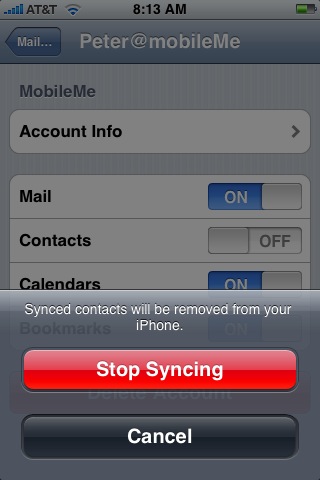
4. I waited a few seconds then I went back to the screen in Step 2 above and turned Contacts “On.”
5. I gave the iPhone some time to sync. It probably helps to be on wifi.
6. When I reopened my Contacts on my iPhone, they had all returned. Note on this last step you might have to open and close Contacts a few times to get your iPhone to force a MobileMe sync.
I have no idea why this is happening. Looks like MobileMe has some work to do!

how do i get my sim contact i lost whene resotre my ipohone
Amaan 76,
You could try:
Settings -> Mail, Contacts, Calendars -> Import SIM Contacts (Button)
Or you might go to Apple Discussions at http://discussions.apple.com/category.jspa?categoryID=201 and do a search on the problem. I use it all the time and find it very helpful.
Thankfully the there is a way to get all of your contacts back. Firstly open iTunes then click edit, then preferences, devices and you will then see that you have a back up from an earlier date before your Outlook Express error, select it and close the window.
Then right click on devices, which is your iPhone on the left and then select restore from back up, once prompted select the backup date that you have chosen. That should now restore all your contacts to before your error.
Hi I have a question okay so I sync my iPhone but I can’t get my contacts back on the iPhone but I backed up my iPhone so… How an where can I find my contacts????
Hi Rosa,
I’m not sure exactly what the issue is. I would suggest you post the question at the iPhone discussion board. Folks have lots of expertise and are usually quick to respond. Good luck and here’s the address http://discussions.apple.com/forum.jspa?forumID=1144
Hi, please i need help, as i know that Iphone dose not save the contatcs to the sim, so what i did by mistake i went to simport and clicked import, and now im without contacts, i know that i can restore it from the backup but i did back up manaully after this which leaded to delet the old one.
please any idea?
I’m not sure exactly what the issue is. I would suggest you post the question at the iPhone discussion board. Folks have lots of expertise and are usually quick to respond. Good luck and here’s the address.
http://discussions.apple.com/forum.jspa?forumID=1144
Thank you for your post. I was able to help a friend recover their ‘lost’ address book by following your simple instructions.
Jan, so glad it worked for you. I haven’t loaded the OS 4 yet, but I’m hoping this technique will continue to work.
I too lost my contacts when I was ask to accept 4.2.1 version of software during a routine sync. All the info ATT tranfered to my Iphone (contact list) from my old non-smart phone sim is gone. I have no MobileMe cloud (what-ever that is), but Apple wants $99.00 to store/safeguard my phone contact after I NEVER lost my numbers in the past 12 years with so-called dumb phones. Come-on Apple I am so mad my head is going to explode and yes I called your support line and they had me try; import from SIM, check MS outlook on my laptop, and check itunes backup in which by the way only holds -ONE- the most recent sync backup. So how about farther back than the most recent or more than one backup to choose from. That should be a given. My history and social networking is “poof” gone! Why? How can it be stressed the importance of backing up our numbers when the stores selling this product know nothing of it. Why was there not a copy of my SIM? What does this SIM store? Why did itunes save all my pictures, music, messages, phone history but loose my phone numbers and names. When looking at past messages, instead of reading the name of who its from it just gives the phone number. Please Help Me! Who took my contact list and did Apple steal and sell my personal info? Nothing so important should ever be deleted without at the very least ending up in the my recycling bin.
John,
Apple sure made a mess of your data – all because you updated the software. I suggest post your comment on the Apple discussion board http://discussions.apple.com/forum.jspa?forumID=1142
Apple need to see what happened to you. Also there are many very knowledgeable folks (more than me) who follow the discussion board and may be able to help.
Thank You. This worked for me. Cannot thank you enough.
Hi Sheila – glad it helped!
This morning I tried to access my contacts and they were all gone. I also looked at my phone and instead of names, it had just numbers. I don’t have the laptop with which I originally synched with iTunes . I didn’t do anything and the contacts just disappeared . Any ideas? Does apple keep my contacts somewhere other than iTunes ?
Hi Cesar,
iTunes does not store contacts.
Contacts are designed to be synced with a supported address book application on your computer with iTunes serving as the sync conduit between your iPhone and the supported address book application on your computer. With a Mac, this can be with the Address Book application. Or you might have a PC running an Outlook address book.
Are your contacts available on your computer?
Thank you so much for this post!!!!! I got all my contacts, back!!!!
Thanks for the information . My boyfriend lost his contact and I was able to restore the contact. He lost contacts on the 4s instead of MobileMe you will need to use iCloud.
Great website you have here but I was curious about if you knew of any message boards that cover the same topics discussed here?
I’d really love to be a part of community where I can get responses from other experienced individuals that share the same interest. If you have any suggestions, please let me know. Kudos!
Lost contacts also nothing seems to work to get them back. Must be in a cloud somewhere
If you’ve been backing up to iCloud. Contacts should be there. You can try going to iCloud via the web to check.
I have two iPhones which are both linked the same Apple ID and on one of my iPhones I have downloaded an app called “find my iPhone” on one of my iPhones and on that app I have clicked “lost my iPhone” which has now deleted all my data from my other iPhone eg contacts photos EVERYTHING basically and they were really important contacts and notes is there a way I could get it all back please?
Daniayal,
Sorry I don’t have any answers to that problem. You might try posting the question at Apple Communities iPhone group. Smart people and quick to answer.
Hope that helps ~ Peter
Thanks a lot for the guide!
Now I finally know how to recover contacts from iPhone.
Check your iTunes and iCloud first of all.
Thank You, showed this to my daughter, she did it, and restored all her contacts.
helped me with father / daughter time.
thank you
Glad to hear that on both counts
Actually, there are three ways to recover lost contacts of iPhone, one is from the iTunes backup files, or you can choose recover from iCloud backup files, another one is recover them directly from iPhone with the help of FonePaw iPhone Data Recovery software, since you are wondering about the way without the using of iTunes backup, you can choose a kind of iPhone Data Recovery software to recover your contacts in a few steps and it is very easy and fast, you can have a try!