Great to meet you… My name's Peter Pappas, from Rochester NY. I taught high school social studies for over 25 year, became a K-12 coordinator and then finished the last 5 years of my career as a assistant superintendent for instruction. Since then, I've been able to devote myself, full time, to expanding my role as a staff developer and consultant.
I've had the chance to work with districts across the country with a focus on literacy, technology, document-based instruction and student engagement. Staff development should model what we want to see in the classroom, so I bring an audience response system and we actually use the techniques I'm promoting!
Follow me on Twitter – hope you have a great conference!
Oh .. and … have you heard of any good sushi restaurants nearby? …..
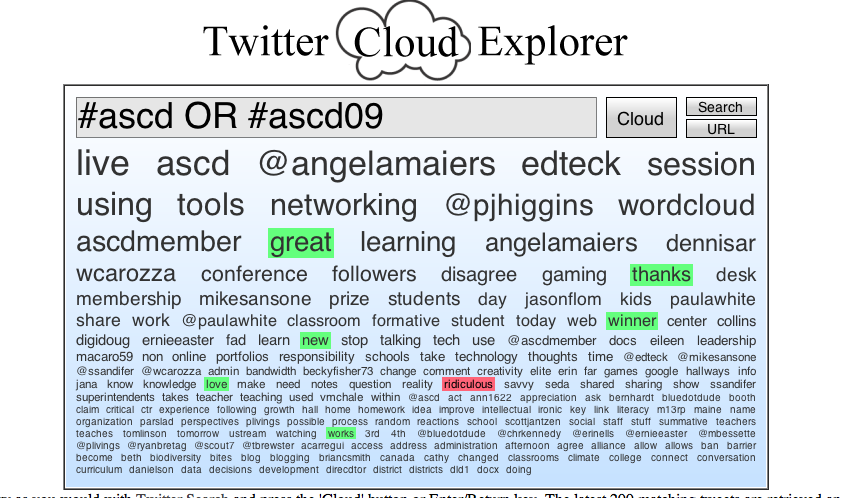
Note: As of 4/26/09 the TwitterCloudExplorer seems to have disappeared. Here's a screen shot of what it looked like during the ASCD conference. Notice my Twitter name edteck was the 4th most Twittered word when I took the screen shot.
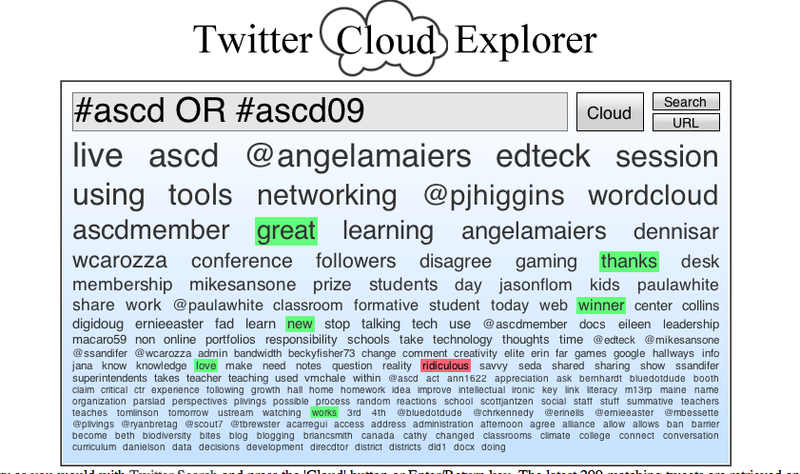
Technical Specs1. Hashtags are a community-driven convention for adding additional context and metadata to your tweets. They're like tags on Flickr, only added inline to your post. You create a hashtag simply by prefixing a word with a hash symbol: #hashtag. I sought out the relevant hashtags people are using for the ASCD conference. Note: It seems this year both #ASCD and #ASCD09 are being used. For more on hashtags2. I used a Twitter Search to look for people using the #ASCD OR #ASCD09 hashtags. Search results here.3. Then I sent out Tweets to people using either hashtag with a link back to this post. Hopefully their replies will follow.4. I'm a big fan of quantitative display of information, so I used one the many new Twitter visualization tools – Twitter Cloud Explorer to generate this embedded query. Note: As of 4/26/09 the TwitterCloudExplorer seems to have disappeared. There are many new Twitter visualizations coming along every day.
How To Use Twitter to Virtually Network at the ASCD Conference 2009
I couldn't attend this year's ASCD conference currently going on in Orlando. That's a shame, since conferences are such a great place to meet new people and share ideas. So I thought I use Twitter to see if I can virtually meet folks and share thinking.
First here's my elevator speech introduction – conference attendees pretend we just met over coffee…

Thanks for the tip on the Twitter Cloud Explorer! Cool tool.
Peter- Twitter is an amazing way to connect and learn, anytime and anywhere! What a great way to get folks excited about the potential and the possibility of networking and learning ….and it is all in just 140 characters!
hey Peter–Cool cloud! We’re stoked to see all the folks using #ascd09, and will be posting clips from these conversations in our Conference Daily newspaper on Monday (it’s fully avail. online, click the icon in upper right of http://www.ascd.org/blog
Hi Laura,
Glad you like it. Idea came to me in the middle of the night. Got working on it this AM after yoga. (Nice not to have a day job anymore. Gives you time to be creative.)
It’s generated tons of contacts -which is exactly what’s cool about social networking!
Hope to see it on your Conference Daily.
Cheers,
Peter
Angela,
The 140 max forces you us to get to the point. Can they install that at meetings?
I only joined Twitter a few months ago – right away I spotted your great work and started following you.
Cheers,
Peter
Hi Mike,
Looks like you were multitasking at MUN – we texted on FB and your lurking at Twitter. Why not celebrate your birthday?
Cheers,
Peter
What a GREAT tool! Thanks for sharing!
I’m live-blogging the ASCD here:
http://www.inpractice.edublogs.org
Thanks Angela,
I’m actually attending two ASCD workshops at once at home right now. Texting in both. Plus following a Twitter stream. And I’m at home with my coffee. Maybe I ought to cut down on coffee!
What a great use of Twitter! I think that even if I was attending the conference, I would still look back through this to see what I missed. I’d never heard about the Cloud before – how cool! Thanks for sharing! -@kate__k
Hi Kate,
Glad you like it.
I think we sometimes confuse creating (high level Bloom) with creativity. Creating is a new combination of existing material/info. By that definition, all kids can create!
Heck, even as a Twitter newbie, I figured out how to put a few tools together in a new way.
Cheers,
Peter
Hi. Several of us will try live Tweeting the AERA conference next week in San Diego
http://www.aera.net/Default.aspx?id=5348
We have set up a wiki
http://aeratweetup.pbwiki.com/
and a twitter stream
http://twitter.com/AERAtweetup
Paul Baker
AERA Communication & Outreach Committee
Paul,
Good luck with the AERA / Twitter connection. Look’s like the Communication & Outreach Committee is on the mark!
Cheers,
Peter